


Portable projectors are a game-changer for anyone who loves watching movies, gaming, or giving presentations on a big screen without the hassle of heavy equipment. The best part? Getting your projector up and running is quick and straightforward! Whether you’re setting it up for a cozy movie night or a professional presentation, this guide will help you go from unboxing to enjoying your big screen in just a few minutes.
Step 1: Unbox and Check Your Gear
Start by unboxing your projector and making sure all the necessary components are included. Most portable projectors come with:
- The projector itself
- A power cable or adapter
- A remote control
- HDMI or other connecting cables
- A user manual
- (Sometimes) a carrying case
Quick Tip: Keep the box and packaging in case you need to transport or return the projector later.
Step 2: Find the Perfect Spot
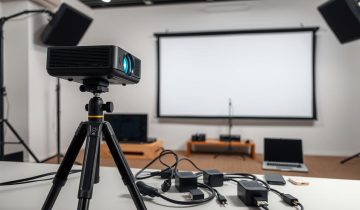
Choosing the right location is essential for the best experience. Look for a flat, stable surface to place your projector or use a tripod for more flexibility. Aim the projector at a blank wall or a screen.
Things to Consider:
- Distance: Check the projector’s manual for the recommended throw distance to get the perfect screen size and clarity.
- Power Source: Make sure you’re close to a power outlet or that the projector’s battery is fully charged.
- Lighting: The darker the room, the better the image quality will be.
Step 3: Set Up Your Screen
If you have a projector screen, great! It’s the best option for a sharp, vibrant image. If not, a blank, smooth wall will work in a pinch. Just make sure it’s clean and white for the clearest display.
Pro Tip: Consider investing in a portable pull-down or pop-up screen. They’re easy to use and make a big difference in picture quality.
Step 4: Connect Your Devices
Decide what you’re using to play your content and connect it to the projector. Most projectors support multiple input options:
- HDMI: Ideal for connecting laptops, gaming consoles, or streaming devices like Roku or Fire Stick.
- USB: Great for playing movies or presentations directly from a flash drive.
- Wireless: Use Wi-Fi or Bluetooth to mirror your smartphone or tablet screen.
Pro Tip: Stick with high-quality cables to avoid connection issues or image glitches.
Step 5: Power It On and Adjust Settings
Turn on your projector and connected device. Once everything is powered up, tweak the settings for the best image:
- Focus: Use the focus ring or buttons to sharpen the picture.
- Keystone Correction: Fix any distortion so the image looks rectangular and aligned.
- Zoom and Size: Adjust the screen size to fit your wall or screen perfectly.
Most projectors also have preset modes like “Movie,” “Presentation,” or “Gaming” to automatically optimize settings for different types of content.
Step 6: Test the Audio
While portable projectors often include built-in speakers, they might not pack enough punch for larger spaces. If you need better sound, connect external speakers via Bluetooth or an audio cable.
Pro Tip: Position your speakers close to where you’re sitting for clearer sound.
Step 7: Fine-Tune Picture Quality
Take a moment to adjust the picture settings. Play around with brightness, contrast, and color settings until the image looks just right. If you’re watching a movie, consider using a dark mode or cinema preset for richer blacks and better contrast.
Step 8: Enjoy the Show!
You’re all set! Dim the lights, grab some snacks, and settle in for your big-screen experience. If you’re using the projector for work or a presentation, do a quick test run to ensure everything works smoothly before starting.
Troubleshooting Common Problems
- Blurry Image: Adjust the focus ring and check the distance between the projector and the screen.
- Dim Display: Try reducing ambient light or increasing the brightness setting on your projector.
- No Sound: Make sure the volume is up on both the projector and your connected device, and check the audio source.
Conclusion
Setting up a portable projector is surprisingly easy, and with just a few adjustments, you’ll be ready to enjoy a crisp, clear display in no time. Whether it’s for a movie night, a gaming session, or a business presentation, portable projectors make it easy to bring the big screen anywhere.
Follow these steps, and you’ll be projecting like a pro in minutes. Ready to start? Unbox your projector and let the fun begin!
 No products in the cart.