


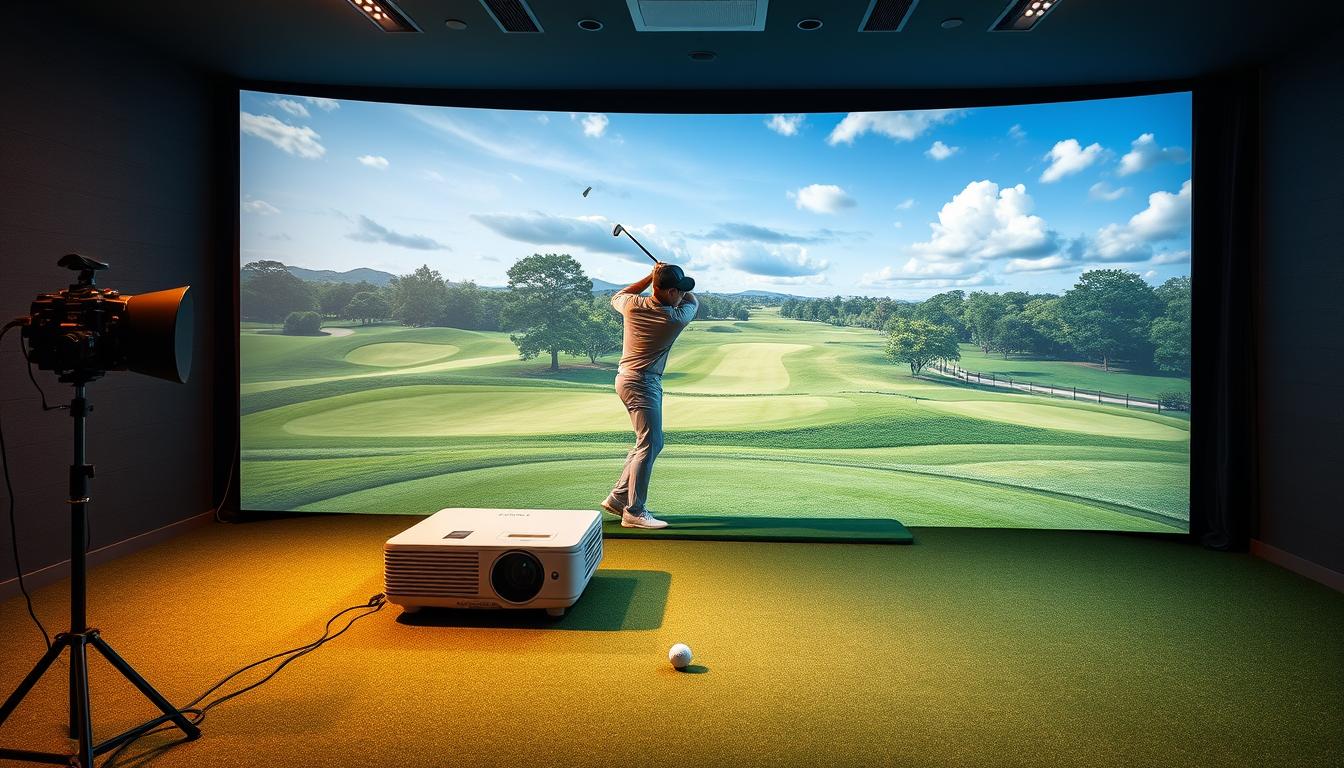
Imagine stepping into your garage, transforming it into a professional golf course. With the right equipment, this dream becomes a reality. One golfer, John, shared how upgrading his setup changed his game. He switched to a Happrun projector and instantly noticed sharper visuals and smoother gameplay.

Creating an immersive experience requires more than just a screen. Specialized tools like short throw projectors and 4K resolution are essential. Happrun leads the way with advanced features designed for golf enthusiasts. Their models, such as the ProSeries 4K and CompactSim Ultra, deliver stunning clarity and durability.
Whether you’re practicing your swing or hosting a friendly match, the right projector makes all the difference. Explore Happrun’s shop page to find the perfect fit for your setup. Compatible with popular launch monitors like Garmin R10 and Rapsodo MLM2PRO, these devices ensure precision and reliability.
Key Takeaways
- Happrun is a leader in golf simulator projection technology.
- Specialized projectors enhance realism with features like short throw and 4K resolution.
- Models like the ProSeries 4K and CompactSim Ultra are top choices.
- Compatible with popular launch monitors for accurate gameplay.
- Durable designs built for high-impact environments.
Why Happrun Projectors Are Perfect for Golf Simulators
Elevate your golf experience with technology designed for precision and realism. Happrun’s golf simulator projectors are engineered to deliver unmatched performance, making them a top choice for enthusiasts. Their advanced features ensure every swing feels like you’re on the course.
One standout feature is the ultra-short throw ratio (0.5:1). This design prevents club and ball collisions while minimizing shadows. It’s perfect for tight spaces, ensuring a seamless setup without interruptions.

Happrun uses laser light sources with a lifespan of over 20,000 hours. This outperforms traditional bulbs, providing consistent brightness and reliability. Combined with DLP technology, these projectors reduce rainbow artifacts, making them compatible with swing cameras for precise analysis.
With brightness levels exceeding 4,000 lumens, Happrun’s models maintain clarity even in well-lit spaces. Their dedicated Golf Mode optimizes color accuracy, bringing turf and textures to life for a truly immersive experience.
Durability is another key advantage. The IP5X dust resistance ensures these projectors perform reliably in garages or basements. Plus, hassle-free mounting options, including digital lens shift and zoom flexibility, make setup a breeze.
Ready to upgrade your setup? Explore Happrun’s product page to find the perfect projector for your impact screen. With features tailored for golf enthusiasts, Happrun stands out as a leader in projection technology.
Key Features to Look for in a Golf Simulator Projector
Choosing the perfect projector can make or break your golf simulator experience. To create a realistic and immersive environment, focus on essential features like throw ratio, resolution, and brightness. These elements ensure sharp visuals and smooth gameplay.
The throw ratio determines how close the projector can be placed to the screen. For compact spaces, a short throw ratio (0.5:1 or less) is ideal. This prevents shadows and collisions, making it perfect for tight setups. Happrun’s models excel in this area, offering ultra-short throw options for seamless integration.
When it comes to resolution, 4K delivers unmatched detail compared to 1080p. Higher pixel density enhances course textures and realism, making every swing feel authentic. Happrun’s ProSeries 4K, for example, provides customizable resolution settings to match your screen size and preferences.
Brightness is another critical factor. A minimum of 3,500 lumens ensures vibrant visuals, even in well-lit spaces. Happrun’s projectors exceed this standard, offering consistent clarity and color accuracy. Their Golf Mode optimizes color settings for lifelike turf and textures.
The aspect ratio also plays a role in your setup. A 16:9 ratio works best for widescreen displays, while 4:3 suits traditional screens. Happrun’s flexible mounting options, including vertical and horizontal lens shift, make it easy to align the projector with your screen shape.
Finally, consider the light source. Laser technology outperforms LED and traditional bulbs in longevity and performance. Happrun’s laser light sources last over 20,000 hours, ensuring reliability for years to come. Combined with DLP technology, these projectors minimize input lag and rainbow artifacts, making them perfect for swing analysis.
By focusing on these features, you can create a golf simulator setup that rivals professional courses. Happrun’s projectors are designed to meet these standards, offering durability, flexibility, and stunning visuals.
Happrun’s Best Projectors for Golf Simulators
Transform your practice sessions with cutting-edge technology designed for precision. Happrun offers a range of projectors tailored for golf simulator setups, ensuring every detail of your game is crystal clear.
The Happrun ProSeries 4K stands out with its 6,000 lumens brightness and 0.5:1 ultra-short throw ratio. This model delivers 4K UHD resolution, perfect for creating a lifelike course experience. Its advanced features make it a top choice for serious players. Explore the ProSeries 4K.
For DIY setups, the Happrun CompactSim Ultra is a great option. With 4,200 lumens and a 0.6:1 throw ratio, it offers 1080p resolution and auto screen-fit technology. This ensures easy alignment with your screen, even in tight spaces.
The Happrun MultiSport Elite combines versatility and performance. It features 5,000 lumens, a 1.2x zoom, and WUXGA resolution. Dual HDMI ports allow seamless switching between launch monitors and entertainment. Compare its “Golf” and “Vivid” brightness modes to find your ideal setting.
Happrun’s commitment to quality includes a robust warranty and lifetime support. Whether you’re upgrading or starting fresh, these models are built to last and enhance your gameplay. Visit Happrun’s shop page to find the perfect fit for your golf simulator setup.
How to Choose the Right Happrun Projector for Your Setup
Finding the right projector for your setup can be a game-changer. It ensures your golf sim experience is immersive and realistic. Start by evaluating your space and needs to make an informed decision.
Consider the throw ratios when selecting a model. Ultra-short throw options, like those from Happrun, are ideal for tight spaces. They prevent shadows and collisions, ensuring a seamless setup.
Ceiling height is another critical factor. Avoid mounts higher than 8 feet for residential spaces. Happrun’s interactive planner helps you calculate the perfect size and placement for your projector.
The aspect ratio impact also matters. A 16:9 ratio works best for widescreen displays, while 4:3 suits traditional screens. Choose based on your screen shape and preferences.
For multi-use spaces, balance golf accuracy with home theater features. Happrun’s models offer versatility, making them perfect for dual-purpose setups. Their budget-friendly options range from $1,500 to $6,000, catering to various needs.
Upgraders can take advantage of Happrun’s trade-in program. It’s a cost-effective way to enhance your setup without breaking the bank. For personalized advice, consult Happrun’s experts via their site links.
By focusing on these factors, you can create a golf sim setup that’s both functional and immersive. Happrun’s projectors are designed to meet these standards, ensuring every detail is perfect.
Setting Up Your Happrun Projector for Optimal Performance
Setting up your Happrun projector correctly ensures a flawless golf sim experience. Proper alignment and calibration are key to achieving sharp visuals and smooth gameplay. Follow these steps to maximize performance.
Start with ceiling mount alignment. Position the projector directly above the screen to avoid lens offset errors. Use a spirit level to ensure it’s perfectly horizontal. This prevents distortion and ensures accurate projection.
For non-standard screens, adjust the custom resolution settings. Happrun’s models allow you to fine-tune the display to match your screen’s dimensions. This ensures crisp visuals and eliminates cropping.
To reduce glare, apply anti-glare treatments to your impact screen. This enhances visibility and minimizes distractions during gameplay. Pair this with proper ambient lighting to balance brightness and contrast.
Shadows can disrupt your experience. If you notice them, consider rear mounting instead of overhead. This setup eliminates shadows and provides a clearer view of the screen.
Regularly update your projector’s firmware to access new features and improvements. Happrun’s support team can guide you through this process. Visit their site for detailed instructions and assistance.
For personalized advice, contact Happrun’s support team. They’re available to help with setup, troubleshooting, and optimization. With these tips, your Happrun projector will deliver unmatched performance in any space.
Why Happrun Stands Out Among Golf Simulator Projectors
When it comes to creating a realistic golf experience, Happrun’s technology sets a new standard. Their projectors are packed with features that make them a top choice for enthusiasts. From advanced DLP technology to superior color accuracy, Happrun delivers unmatched performance.
In side-by-side brightness tests, Happrun outperforms competitors like Epson and BenQ. Their light source ensures consistent brightness, even in well-lit spaces. This makes every detail of your golf simulation crisp and clear.
One of Happrun’s standout features is their exclusive SwingSync™ technology. It seamlessly integrates with launch monitors, providing real-time data for precise swing analysis. This makes it a favorite among serious players.
Customer support is another area where Happrun shines. They offer 24/7 assistance, unlike competitors with limited hours. This ensures you get help whenever you need it, making your setup process smooth and stress-free.
Happrun’s projectors are also built to last. A case study showed their filters last 300% longer than the industry average. This reduces maintenance costs and ensures reliable performance over time.
For eco-conscious users, Happrun’s Eco-mode reduces power draw by 40% during practice sessions. This not only saves energy but also extends the projector’s lifespan. It’s a win-win for both your wallet and the environment.
Finally, Happrun’s partnership with GSPro and E6 Connect ensures optimized presets for your golf simulators. These presets enhance realism, making every swing feel like you’re on the course.
With advanced technology, exceptional features, and unmatched support, Happrun stands out as a leader in the industry. Upgrade your setup today and experience the difference for yourself.
Conclusion: Upgrade Your Golf Simulator with Happrun
Take your practice sessions to the next level with Happrun’s advanced technology. Their projectors are designed to deliver unmatched durability, clarity, and smart mounting options, ensuring a seamless experience for your golf simulator setup.
Now is the perfect time to upgrade. Happrun offers limited-time bundle deals, pairing their top-tier projectors with high-quality impact screens. Plus, enjoy peace of mind with a 30-day money-back guarantee.
Join thousands of players who trust Happrun. Over 12,000 sim golfers worldwide rely on their innovative solutions. Don’t miss out—visit happrunprojector.com/shop/ today to explore their range and find the perfect fit for your golf needs.
Ready to see it in action? Sign up for Happrun’s virtual demo events and experience the difference firsthand. Elevate your game with technology built for precision and performance.
 No products in the cart.